How to Share Code Snippets on Social Media (The Easy Way)
So you wrote some cool code and want to share it online — but when you paste it into Twitter,Facebook, Instagram, or LinkedIn, it looks like a total mess. No colors, no formatting, just a wall of plain text that nobody wants to read.
Don't worry. This happens to everyone. And there's a super simple fix.
Why Pasted Code Looks Terrible on Social Media
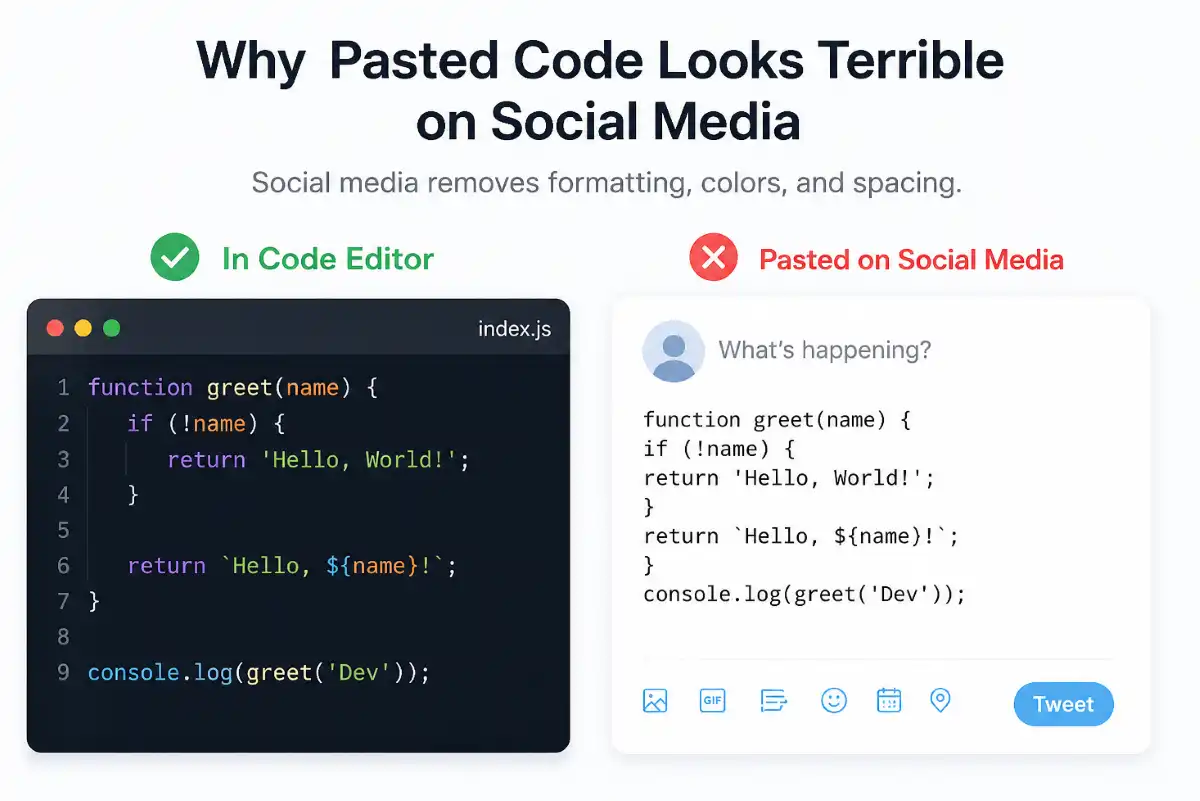
Social media platforms strip out all the special formatting that code editors use. Things like:
- ▸Syntax highlighting (the colors that make code readable)
- ▸Monospace fonts
- ▸Proper indentation
So your beautifully written Python or JavaScript ends up looking like jumbled text. Not exactly the vibe you're going for.
The Easiest Solution: Turn Your Code Into an Image
The best way to share code on social media is to convert it into an image first. Here's why this works so well:
How to Convert Code to an Image (Step by Step)
You don't need to take a screenshot or use Photoshop. There are free online tools that do it in seconds.
- 1Copy your code from your editor.
- 2Open a code-to-image tool (like the one on this site!).
- 3Paste your code in.
- 4Choose your theme, font, and background color.
- 5Download the image and post it directly to social media.
That's it. The whole process takes about 30 seconds.
Try the Code to Image Tool →Which Platforms Work Best for Code?
Tips for Getting More Engagement
- ▸Add context in the caption — explain what the code does and why it's useful
- ▸Use a clean theme — dark backgrounds with bright syntax colors get the most attention
- ▸Keep it short — 5–20 lines is the sweet spot
- ▸Ask a question — "Did you know you could do this in one line?" invites people to engage
- ▸Use relevant hashtags — #coding, #webdev, or your specific language
Other Ways to Share Code (And Why Images Win)
| Method | Pros | Cons |
|---|---|---|
| Code Image | Beautiful, works everywhere | Requires a tool |
| GitHub Gist | Good for long code | Requires a click-away link |
| Plain text | Quick and easy | Loses all formatting |
| Code blocks | Works on Dev.to/Hashnode | Broken on mainstream social media |
Ready to Make Your Code Look Great?
Our code to image tool lets you paste your snippet, customize the look, and download a share-ready image in seconds.
Try the Code to Image Tool →